
YouTube Video Downloader
Download any YouTube video, Short, or playlist as an MP4 — pick your quality, click once, and it's on your computer in seconds.
Overview
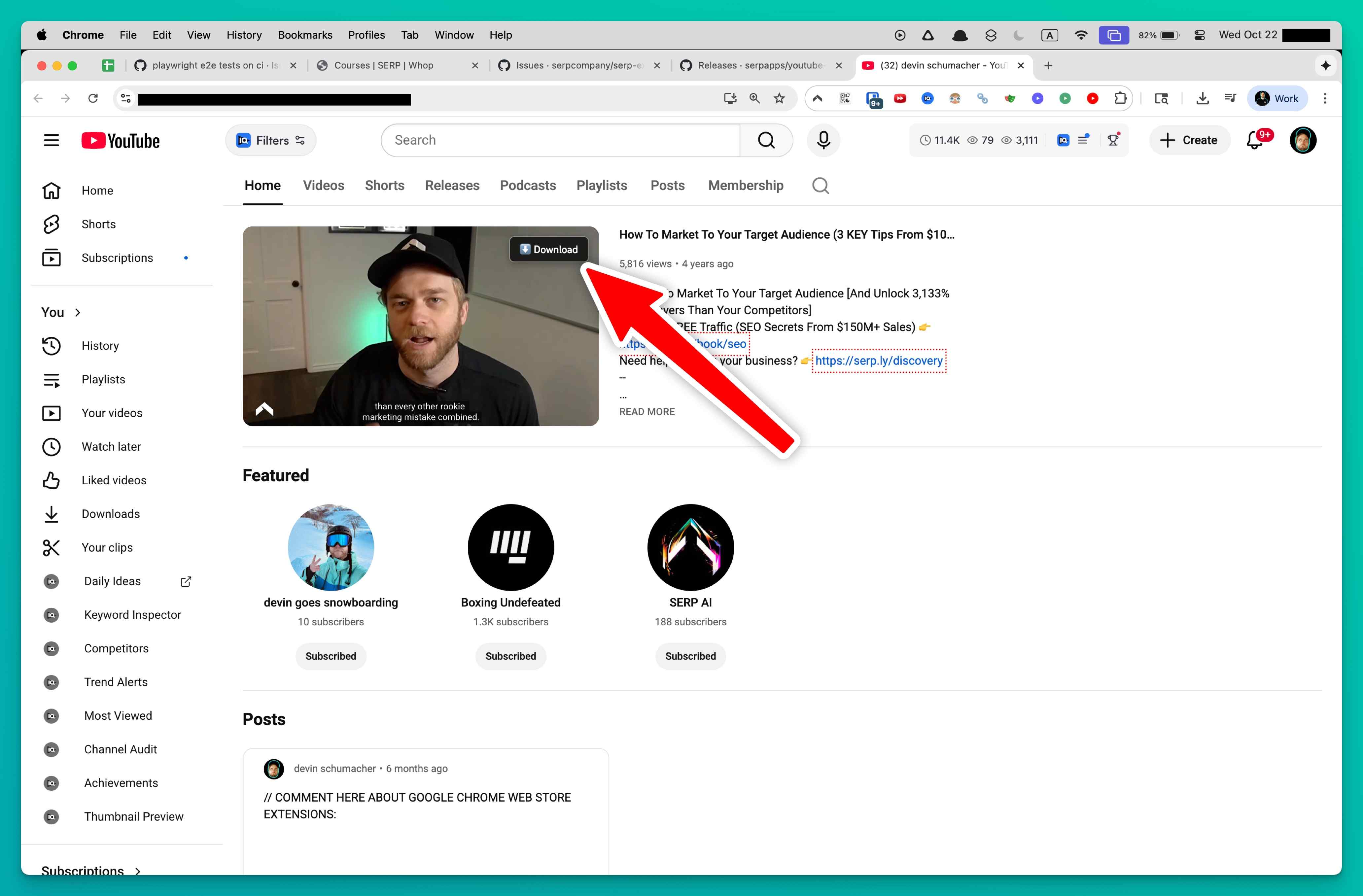
The perfect tutorial, a lecture needed for class, or a music video for a flight. YouTube won't let you save any of it. Online converter sites are a minefield of pop-ups and fake download buttons. This extension skips all of that. Install it, browse YouTube normally, and a download button appears on every video. Click it, pick your quality (up to 4K when available), and the MP4 saves straight to your computer. It works on regular videos, Shorts, entire playlists, and YouTube players embedded on other websites.
The extension handles everything behind the scenes. It grabs the best available video and audio, combines them into a single ready-to-play file, and drops it in your downloads folder. Queue up to three downloads at once with live progress tracking, and they keep running in the background while you browse other tabs. Need a whole playlist? Queue every video and let it work through them one by one.
Everything stays private. Downloads happen locally on your device, nothing gets uploaded anywhere, and there's zero tracking or analytics. Try 3 free downloads to see how it works, no credit card needed.
Why It Exists
- Archive Shorts, playlists, embedded players, and unlisted review links in their original quality without screen-recording workarounds.
- Get ready-to-edit MP4 files by automatically merging YouTube's split adaptive audio and video streams.
- Keep your viewing and download activity completely private with on-device decryption, local processing, and no telemetry.
- Save hours on batch workflows with playlist queuing, background processing, and one-click yt-dlp command generation.
Key Features
- Detects YouTube watch pages, Shorts, playlists, and embedded players automatically
- Decrypts signature-ciphered and n-parameter-throttled stream URLs in real time
- Parses DASH manifests and HLS playlists to surface every available quality tier
- Merges separate video-only and audio-only adaptive streams into a single MP4 or WebM
- Lists all available resolutions from 360p to 4K with file-size estimates before download
- Remembers your preferred quality setting and applies it automatically on future downloads
- Queues up to three simultaneous downloads with live progress, speed, and ETA tracking
- Runs downloads in the background so you can browse other tabs without interruption
- Supports playlist downloads with sequential queuing of individual videos
- Generates ready-to-run yt-dlp commands for advanced CLI and batch workflows
How It Works
- Install the extension: Add YouTube Downloader to Chrome, Edge, Brave, or Opera and activate your license. The extension integrates directly into YouTube pages.
- Browse YouTube normally: Navigate to any watch page, Shorts feed, playlist, or embedded player. The extension detects playable content and decrypts the adaptive stream URLs automatically.
- Pick your quality and download: Click the download button to see every available resolution with file-size estimates. Select your preferred quality and the extension fetches, merges, and saves the final MP4.
- Edit or archive offline: Your finished MP4 or WebM file is ready in your downloads folder. Use it for editing, presentations, research, or offline viewing on any device.
Reviews
- Finally handles encrypted YouTube streams (5/5): We archive client livestreams and Shorts. This is the only tool that keeps up with YouTube's encryption changes and still hands back perfect MP4 files. - Caleb Whitford
- A must-have for creative briefs (4.9/5): The quality list and file-size estimates mean no surprises, and the three-download queue lets me prep assets for edits in one sitting. - Natasha Yuen
- Great for research teams (4.8/5): Embedded videos on partner portals used to be a pain. This extension detects them instantly and finishes the background conversion while we keep browsing. - Simon Greaves
Platform Support
Browsers
- Chrome
- Edge
- Brave
- Opera
Operating Systems
- Windows
- macOS
- Linux
Supported Content
- YouTube watch pages, Shorts, and playlist videos
- Embedded YouTube players on third-party sites
- Livestream replays after on-demand version is available
- Age-restricted and unlisted videos accessible via your session
- DASH and HLS adaptive streams merged into MP4 or WebM
Not Supported
- DRM-protected purchased movies and TV episodes
- Active livestreams still broadcasting
- Firefox (Manifest V3 compatibility pending)
- Safari and mobile browsers
- YouTube Music premium audio-only streams
Privacy and Permissions
Supported regions: Worldwide.
Limitations:
- DRM-protected YouTube purchases (movies, TV episodes) cannot be downloaded.
- Active livestreams must finish broadcasting and have a replay available before download.
- Available quality depends on the original upload resolution and YouTube's encoding options.
- DASH stream merging requires the original tab to remain open until the MP4 is finalized.
- YouTube frequently rotates cipher algorithms, so keeping the extension updated is important.
- Firefox support depends on Manifest V3 compatibility in the current browser build.
- Safari and mobile browsers are not supported.
- YouTube Music premium-only audio streams are not accessible.
Permissions:
- downloads: Writes the merged MP4 or WebM files directly to your downloads folder and tracks progress for simultaneous jobs.
- storage: Saves licence activation, preferred quality settings, and queue history locally so everything persists between browser sessions.
- activeTab: Injects the downloader UI into the YouTube page you're viewing, including Shorts feeds and embedded players.
- tabs: Monitors when you switch videos or open new players so the extension can refresh available quality options automatically.
- scripting: Reads player configuration data to decrypt stream URLs, fetch manifests, and merge DASH or HLS segments into a final MP4.
- notifications: Sends completion, error, and licence prompts without forcing you to keep the popup open during longer conversions.
Links
FAQs



Featured in
Related

Every course and SaaS company uses Wistia, and none of them give you a download button. This does.

You bought the course — but the creator can take it down anytime. Download your Teachable videos before access disappears.
Cancel Hulu whenever you want — but keep the shows. Download episodes as MP4 files you own forever.

You paid for the course — keep it forever. Download full Udemy courses as MP4 videos you own, not ones that expire.

That course uses SproutVideo and there's no download button. Now there is. Save lessons as MP4 files.

Cancel your Whop membership and lose every video you paid for. Unless you download them first.